Walam Pages Redesign: Separate Facebook Pages and Instagram Workspace for Faster Daily Management
This Dashboard update separates Facebook Pages from Instagram account selection inside the Pages area, while turning the Instagram tab into a cleaner workspace for posts and auto reply settings.
Published: 2026-03-25Reading time: 6 min
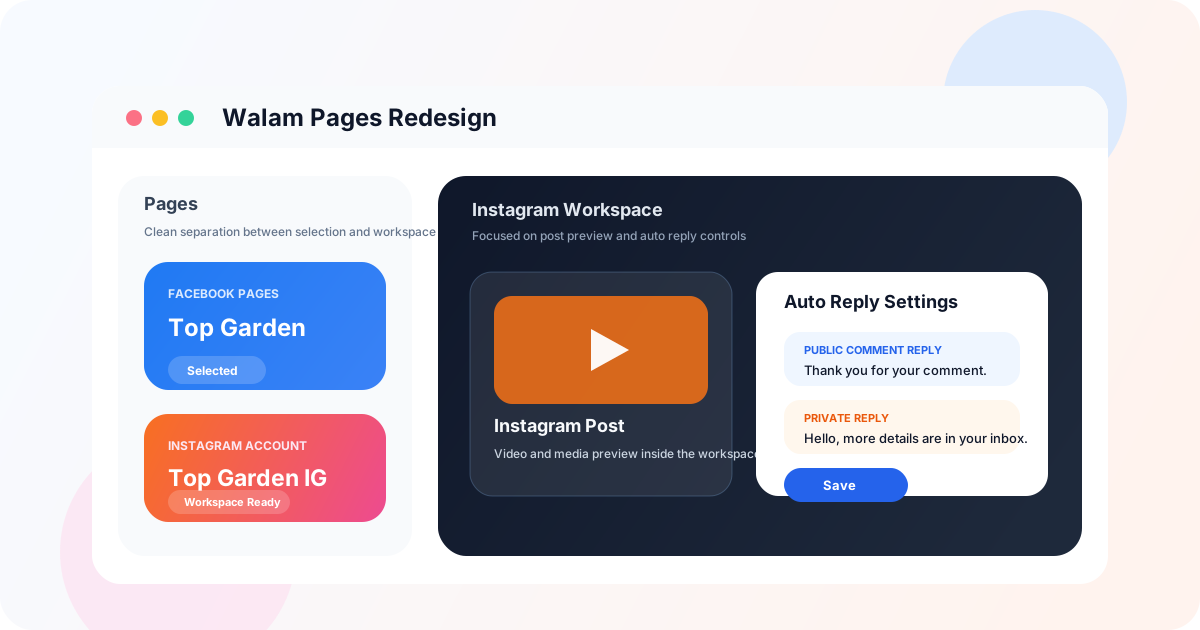
Pages redesign preview with separate Facebook Pages and Instagram workspace areas.
A cleaner Pages area for faster decisions
In the previous layout, Facebook Page selection and Instagram account selection were too close together. That structure worked, but it added unnecessary noise for teams managing more than one page or account. The updated Pages area now gives each part its own card, label, and selected state.
This redesign makes the dashboard easier to scan, faster to understand, and more reliable for daily use when switching between multiple social assets.
Dedicated Facebook Pages block
Dedicated Instagram Account block
Clear selected-state badges
Less dashboard clutter
Instagram selection now lives where setup belongs
Instagram account selection is now placed inside the Pages tab because it is fundamentally a setup task, not an operating task. That means users can complete account and page selection in one place before moving to the actual Instagram workflow.
The result is a stronger separation between configuration and execution, which is especially useful for teams that need to move quickly without losing context.
IG selection moved into Pages
Setup separated from daily operations
Faster switching between assets
Cleaner initial workflow
The Instagram tab is now a real workspace
Once the Instagram account is selected, the Instagram tab becomes a focused workspace for post display, media preview, and auto reply settings. Instead of mixing account-selection controls into that area, the tab is now dedicated to the actions users actually perform there every day.
That makes the Instagram workflow more practical for businesses using Instagram comment auto reply, private reply follow-up, and post-level engagement management.
Focused post and media view
Cleaner auto reply setup area
Less distraction inside the tab
Better support for daily Instagram operations
Why this matters for product clarity and daily use
A stronger dashboard structure helps more than visual usability. It makes the product easier to understand the moment a user enters the Pages area. When Facebook page management, Instagram account selection, and Instagram auto reply workflow each have a clear place, the dashboard feels more reliable and easier to operate.
That clarity is especially useful for onboarding, faster team handoff, and more confident day-to-day management across different pages and accounts.
Clearer product positioning
Better onboarding for new users
Faster team handoff
Logical separation between page management and post automation
Key questions
Is this only a visual redesign?
No. The redesign also improves workflow by separating setup actions from operating actions inside the dashboard.
Why is this useful for teams with many pages?
It reduces confusion when switching between Facebook Pages and Instagram accounts and makes the currently selected asset easier to identify.
Is the Instagram tab now focused only on posts and auto reply settings?
Yes. That is the main goal of the update: keep selection in Pages and keep Instagram focused on post management and automation tasks.
Ready to automate your page?
Walam is built for Facebook comment and message auto replies, Messenger Chat Flow, and structured lead collection. First month free.
Auto reply is not just about replying faster. It is a practical way to organize customer communication, build trust, and turn comments and messages into real business opportunities.
Instagram Dashboard Upgrade: Better Post Preview, Video Preview, and Cleaner Auto Reply Settings
Walam’s Instagram section was redesigned to work as a clearer workspace for post preview, video preview, and structured public/private auto reply settings.
This update improves the PM media experience in Dashboard with clearer voice recording controls, smoother image selection, and dynamic Messenger button management.
Walam Light Mode Redesign: A Cleaner Homepage with Soft Glassmorphism
Walam’s white theme was redesigned to feel cleaner, calmer, and more modern, with a softer background, better contrast, and glass-style cards that fit a professional SaaS homepage.
Walam Added Live Chat to the Homepage for Faster Visitor Support
Walam now includes direct live chat on the homepage, making it easier for visitors to send a question instantly and receive a fast reply without leaving the site.
Walam vs ManyChat vs Chatfuel: Which Facebook Auto Reply Tool Fits Your Page?
If you are comparing Walam with ManyChat and Chatfuel, the real question is not brand recognition. It is which tool gives you the best fit for Facebook comments, Messenger replies, language support, and daily page management.
Walam Updates for Facebook Auto Reply: Better Admin Controls, Cleaner Post Automation, and Stronger User Support
This update improves Walam across three key areas: admin dashboard control, simpler post automation setup, and clearer support communication for both new and restricted users.
Best Facebook Auto Reply Tool for Business: What Matters Most
The best Facebook auto reply tool for business does more than answer quickly. It should connect comments, messages, Chat Flow, and lead capture in one place.
If someone searches for page facebook auto replay voice and image, the real need is clear: a Facebook Page that can send richer automated replies using media, not just text.
Automatic Reply Facebook Free: How to Start the Right Way
If you search for automatic reply Facebook free or even automatic replay Facebook free, what you really need is a practical system for comments, messages, and Chat Flow.